Scraper and crawler
Premip Scraper fetches pages in a browser through your Premip proxies and returns Markdown, HTML, links, screenshots or fields you select. Premip Crawler walks a site and streams the pages it finds. Both are open source and run on your own server.
On this page
Overview
| Component | Role |
|---|---|
| Premip Scraper | FastAPI service on port 8000. It validates a request and queues a job; it never runs a browser itself. |
| Scraper workers | Playwright browser workers that take jobs from the queue and fetch the page through your proxy. Scale them independently of the API. |
| Premip Crawler | Service on port 8001 with a URL frontier, scope rules and per-domain rate limits. It has no browser: every page is fetched through the scraper. |
| Redis | Job queue and scraper job store. Finished scrape jobs are kept for 10 minutes by default, so read results promptly. |
| Python SDK | Install from premip.com/docs/sdk. Typed clients for both services and for the account API. |
How it fits together
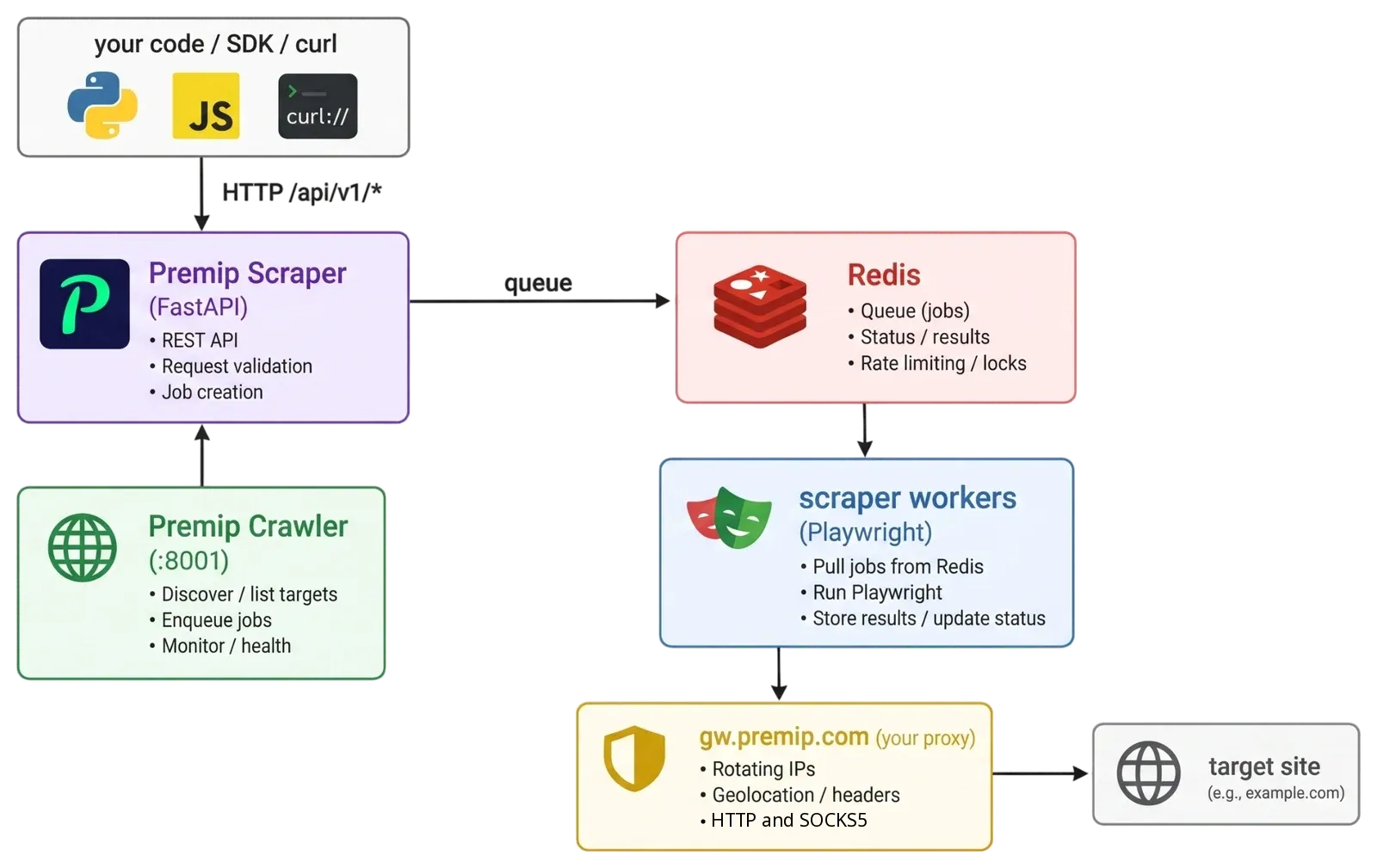
Run it
Clone and configure
Copy .env.example to .env. Set SERVICE_TOKEN to a long random value (openssl rand -hex 32). Set PREMIP_PROXY_API_KEY to a key from Dashboard → Settings → API keys; it is only needed when a request uses a Premip proxy_type. PREMIP_PROXY_API_BASE_URL already defaults to https://api.premip.com.
Start the stack
docker compose -f docker-compose.yml up --build -d starts the API, one worker container, the scheduler, the crawler and Redis. A plain docker compose up also loads docker-compose.override.yml, which is a development file for the crawler (mounted source, auto-reload). Both APIs are published on 127.0.0.1 only.
Change the host port if needed
The scraper container always listens on 8000, and PORT in .env does not change that. If the Premip backend or another service already uses 8000 on the host, edit the published port in docker-compose.yml, for example "127.0.0.1:8100:8000", and use that port in every URL below. PORT only applies when you run python -m src.main outside Docker.
Size the workers
Each worker container runs WORKERS browser processes (default 2) and is capped at 4 GB of memory. Add containers with --scale scraper-worker=3. Run exactly one scheduler.
Check health
GET /api/v1/health returns {"status":"ok","workers":2}. It needs no token. The crawler has its own GET /api/v1/health on port 8001.
git clone https://github.com/Premip-com/premip-python.git
cd premip-python
cp .env.example .env      # SERVICE_TOKEN, PREMIP_PROXY_API_KEY
docker compose -f docker-compose.yml up --build -d

curl -s http://localhost:8000/api/v1/health
# {"status":"ok","workers":2}

# More browser capacity
docker compose -f docker-compose.yml up -d --scale scraper-worker=3
Configuration
| Variable | Purpose |
|---|---|
| SERVICE_TOKEN | Required. Callers send it as X-Service-Token on scrape, search, preset, session and prem-proxies routes, on GET /api/v1/proxies/resolve and available, and on /mcp. If it is empty those routes return 503; a missing or wrong header returns 401. Use the same value for the crawler (Compose passes it on). |
| PREMIP_PROXY_API_KEY | Your Premip API key. The scraper uses it to fetch proxy credentials from the control plane. Scrape requests never carry it. |
| PREMIP_PROXY_API_BASE_URL | Control plane origin. Default https://api.premip.com. |
| REDIS_URL | Job queue and store. Compose sets it for you. |
| WORKERS | Browser processes per worker container. Default 2. |
| REQUEST_TIMEOUT_MS | Default navigation timeout. Default 30000. A request can override it with timeout_ms. |
| MAX_RETRIES | Default number of fetch attempts when a proxy is used. Default 3. |
| BLOCK_ASSETS | Block images, fonts and media to save time and traffic. Default true. |
| QUEUE_MAXSIZE | New jobs are refused with 503 queue_full once the queue holds this many. Default 200. |
| JOB_RESULT_TTL_S | How long a finished job and its results stay in Redis. Default 600. |
| EGRESS_ALLOW_HOSTS | Hosts that browser navigation may reach even though they are not public addresses. Empty by default, so private, loopback and link-local targets are refused. |
Crawler configuration
| Variable | Purpose |
|---|---|
| SCRAPER_URL | Where the crawler reaches the scraper. Compose sets http://web-scraper:8000. |
| SERVICE_TOKEN | Must match the scraper’s value. Sent as X-Service-Token on every call to the scraper. |
| WORKERS | Crawl jobs that run in parallel. Default 2. |
| JOB_TIMEOUT_MS | A crawl that runs longer ends as failed with error job_timeout. Default 3600000 (one hour). |
| MAX_RETRIES | Retries per page after a retryable failure. Default 3. |
| MAP_MAX_URLS | Upper bound on URLs collected by one /map call. Default 5000. |
Scrape a page
Scrapes are jobs. Submit a request, poll the job, then read the results. Send X-Service-Token on every call except /api/v1/health, /api/v1/queue/stats and /api/v1/proxies/countries, which are open. The examples use port 8000.
# Step 1: submit
curl -s -X POST http://localhost:8000/api/v1/scrape/page \
  -H "X-Service-Token: $SERVICE_TOKEN" -H "Content-Type: application/json" \
  -d '{"url":"https://example.com","proxy_type":"prem_res_rotating","proxy_geo":{"country_code":"us"},"formats":["markdown"]}'
# {"job_id":"job_8f2c"}

# Step 2: poll until status is done, failed or cancelled
curl -s -H "X-Service-Token: $SERVICE_TOKEN" http://localhost:8000/api/v1/scrape/job_8f2c
# {"job_id":"job_8f2c","status":"done","done":1,"total":1,"error":null}

# Step 3: read results (kept for 10 minutes by default)
curl -s -H "X-Service-Token: $SERVICE_TOKEN" http://localhost:8000/api/v1/scrape/job_8f2c/results

# Cancel a job: in-flight pages finish, the rest are skipped
curl -s -X DELETE -H "X-Service-Token: $SERVICE_TOKEN" http://localhost:8000/api/v1/scrape/job_8f2c
Job status is queued, running, done, failed or cancelled. POST /api/v1/scrape/pages takes {"pages":[...]} (the same request objects) and returns one job with one result per page, in order. Submit errors: 422 for an invalid request, 404 session_not_found, 410 session_expired, 503 queue_full.
Scrape request fields
| Field | Notes |
|---|---|
| url | Required. The http or https page to fetch. |
| render | true (default) loads the page in a browser and runs its JavaScript. false makes a plain HTTP fetch. |
| wait_until / wait_for_selector | wait_until is domcontentloaded (default), load or networkidle. wait_for_selector waits for a CSS selector after navigation. |
| timeout_ms | Budget for each phase (warm-up, page load, wait_for_selector), not for the whole request, so a request that uses all three can take three times this. Default REQUEST_TIMEOUT_MS. The server shortens it if the job deadline is closer, and warnings says so. |
| device | desktop (default), mobile or legacy_wap. legacy_wap needs render false and cannot be pinned to a saved session. |
| viewport | {width, height} in CSS pixels, 320 to 7680 wide and 240 to 4320 high. |
| headers / cookies | Extra request headers and cookies for the page. cookies cannot be combined with session_id. |
| proxy_type | none (default) fetches from the scraper’s own network. Others: prem_res_rotating (recommended), mobile, mobile_shared, res_static, res_rotating, dc_static. Every type except none needs PREMIP_PROXY_API_KEY. |
| proxy_pool_id | Use one specific purchased proxy of the chosen proxy_type. GET /api/v1/proxies/available lists them. |
| proxy_geo | {country_code, region, city}. country_code is ISO alpha-2. |
| prem_proxy_options | prem_res_rotating only. sub_user_id; zip (not together with region or city); isp; session_type rotating (default) or sticky; sticky_id (1 to 64 letters or digits, sticky only); rotation_minutes (1 to 1440, sticky only); protocol http (default) or socks5; ip_filter max-size-security (default), max-speed-security, quality-security or speed-quality-security. |
| max_retries | 1 to 10 fetch attempts. 1 means a single attempt. On a proxy error or a challenge page the proxy is rotated and the page is fetched again. Ignored when proxy_type is none. Default MAX_RETRIES. |
| formats | Any of markdown, fit_markdown, raw_html, html, links and screenshot. The raw_html and screenshot booleans still work and are merged in. Request only what you need. |
| markdown_options | only_main_content, content_filter (none, pruning or llm), ignore_links, ignore_images, citations and body_width. Applies to the markdown formats. |
| extract | CSS or XPath rules that return named fields in data. See the example below. |
| screenshot / element_selector | screenshot true returns a full-page PNG. With element_selector the PNG is cropped to that element; element_screenshot_status tells you if it fell back to the full page. |
| block_assets | Block images, fonts and media. Defaults to the BLOCK_ASSETS setting. Turn it off when a screenshot needs images. |
| browser_engine | chromium (default), firefox, webkit or camoufox. |
| session_id | Reuse a saved browser session for logged-in pages. It must match the session’s device and proxy settings. |
{
  "url": "https://example.com/products",
  "proxy_type": "prem_res_rotating",
  "extract": {
    "type": "css",
    "container": ".product",
    "fields": {
      "title": { "selector": "h2", "all": true },
      "price": { "selector": ".price", "all": true }
    }
  }
}
Results
GET /api/v1/scrape/{job_id}/results returns the job with a results array that has one entry per requested page, in order. results is null until the first page finishes, and an entry stays null for a page that was skipped. The fields below are on each entry.
{
  "job_id": "job_8f2c",
  "status": "done",
  "total": 1,
  "done": 1,
  "pages": [{ "url": "https://example.com", "proxy_type": "prem_res_rotating" }],
  "results": [
    {
      "request_id": "3d1c…",
      "took_ms": 2140,
      "meta": {
        "url": "https://example.com/",
        "final_url": "https://example.com/",
        "status_code": 200,
        "device": "desktop",
        "proxy_type": "prem_res_rotating",
        "retries": 0,
        "fetch_ok": true
      },
      "markdown": "# Example Domain\n…",
      "warnings": [],
      "error": null
    }
  ]
}| Field | Notes |
|---|---|
| meta | url, final_url, status_code, device, proxy_type, retries and fetch_ok. fetch_ok false means the render failed or hit a challenge page; partial output may still be present. |
| markdown / fit_markdown / markdown_references | Present for the formats you requested. markdown_references holds the citations when markdown_options.citations is on. |
| html / raw_html / links | Cleaned HTML, the full rendered HTML and the absolute links on the page, for the formats you requested. |
| data | Fields from your extract rules. |
| screenshot_base64 | Base64 PNG when screenshot is requested. |
| warnings / error | Non-fatal notes, and the reason a page produced no result (proxy configuration, worker timeout, session failure, cancelled). |
| took_ms / request_id | Time spent and a correlation id to quote to support. |
Search results
POST /api/v1/search returns search results in one synchronous call and takes longer than a page fetch. It needs the service token like any scrape.
| Field | Notes |
|---|---|
| query / engine / locale | query is required. engine is google (default), bing or yandex. locale picks the engine’s regional preset: us, uk, de, fr, ru or jp for google and bing, and ru, gb, kz and others for yandex. |
| limit | 1 to 50 results. Default 10. |
| scrape / scrape_options | scrape true also fetches each result page and attaches it as scrape. scrape_options takes any scrape request field except url. |
| proxy_type / proxy_geo / prem_proxy_options | Route the search itself through a proxy. Without proxy_type the search uses the engine preset’s own setting, and for google that is a direct connection. |
curl -s -X POST http://localhost:8000/api/v1/search \
  -H "X-Service-Token: $SERVICE_TOKEN" -H "Content-Type: application/json" \
  -d '{"query":"site:example.com pricing","engine":"google","limit":5}'
# {"query":"…","count":5,"results":[{"url":"…","title":"…","snippet":"…"}],"took_ms":4210,"warnings":[]}
Presets and saved sessions
Presets are named scrape recipes. List them with GET /api/v1/presets and run one with POST /api/v1/scrape/preset/page (or /pages), which returns a job like any other scrape. Saved sessions keep cookies and storage for logged-in pages: create one with POST /api/v1/sessions (device, proxy settings, ttl_seconds from 300 to 604800, default 86400), sign in with POST /api/v1/sessions/{id}/login or inject cookies with POST /api/v1/sessions/{id}/cookies, then pass session_id on scrapes. Anyone holding a session id can use that login, which is why these routes need the service token.
Crawl a site
Crawls are jobs too, on port 8001. The crawler does not need the service token. scope controls which URLs are followed; enable_scraping decides whether each page keeps its full scrape result or only its URL, depth and status.
| Field | Notes |
|---|---|
| seed_url | Required. Where the crawl starts. |
| scope.mode | same-domain (default, ignores a leading www), subdomains, all or regex. |
| scope.include_patterns / exclude_patterns | Lists of regular expressions matched against URLs. Invalid expressions are rejected when you submit. |
| scope.max_depth / max_pages | Link depth from the seed (default 3) and the page cap (default 500). |
| scope.per_domain_rps / per_domain_concurrency | Requests per second (default 1.0) and parallel fetches (default 1) for each domain. |
| scrape_options | Applied to every page: proxy_type and geo, device, headers, cookies, render, wait settings, screenshot and extract. |
| crawl_proxy | Proxy for discovery-only crawls (enable_scraping false). Without it, scrape_options is used. |
| enable_scraping | false (default) keeps only url, parent, depth and status per page. true keeps the full scrape result. |
curl -s -X POST http://localhost:8001/api/v1/crawl \
  -H "Content-Type: application/json" \
  -d '{
    "seed_url": "https://example.com",
    "scope": {"mode": "same-domain", "max_depth": 2, "max_pages": 50, "per_domain_rps": 1.0},
    "scrape_options": {"proxy_type": "none"},
    "enable_scraping": false
  }'
# {"job_id":"CRAWL_ID"}

curl -s http://localhost:8001/api/v1/crawl/CRAWL_ID            # status, stats, pages so far
curl -s http://localhost:8001/api/v1/crawl/CRAWL_ID/results    # same record
curl -N http://localhost:8001/api/v1/crawl/CRAWL_ID/events     # live SSE stream
curl -X DELETE "http://localhost:8001/api/v1/crawl/CRAWL_ID?hard=false"
The job record has status (queued, running, done, failed or cancelled), stats and pages. stats counts visited, queued, failed, dedup_skipped, out_of_scope, links_dropped and retries_total, with started_at and finished_at. Each page has url, parent_url, depth, fetched_at, took_ms, status_code, error and, when enable_scraping is true, scrape_response. Crawl jobs live in the crawler’s memory, so a restart of the crawler loses them.
- Scope modes: same-domain, subdomains, all or regex, with include and exclude patterns. subdomains compares the last two host labels, so it over-matches on suffixes such as co.uk or github.io; use same-domain or regex there.
- Rate limit and concurrency are tracked per domain and shared by all running crawls. After a 429 the rate is halved for 60 seconds.
- URLs are canonicalised before the visited check: host and scheme are lowercased, default ports and fragments are dropped, and query parameters are sorted. A trailing slash is kept, so /a and /a/ are different pages.
- A failed fetch is retried up to 3 times with exponential backoff (2, 4, 8 seconds, capped at 30) on HTTP 408, 429, 500, 502, 503 and 504, and on connection errors.
- Events on the SSE stream: stats, page, page_error, and a final done or cancelled. A crawl that fails ends with done and status failed. Add ?slim=true to drop screenshots and HTML from page events.
- DELETE stops scheduling new pages; with ?hard=true in-flight work is aborted too.
Map a site
POST /api/v1/map lists the URLs a site exposes in one synchronous call, using robots.txt sitemap entries, sitemaps and the links on the seed page. It returns seed_url, count, urls, lastmod (url to sitemap date), stats, took_ms and warnings.
| Field | Notes |
|---|---|
| seed_url / scope | Required seed. scope.mode and the include and exclude patterns filter the result; depth and rate settings are ignored. |
| include_sitemap / include_page_links | Both default to true. Sitemaps come from robots.txt Sitemap lines, or from common sitemap paths. |
| render | true loads the seed page through the scraper so links added by JavaScript are found. Default false. If it takes longer than 12 seconds the result falls back to sitemap URLs only. |
| search | Keep only URLs that contain this text, case-insensitive. |
| published_after / recent_days / sort | Filter by sitemap lastmod (YYYY-MM-DD, or the last N days) and sort newest first. URLs without a lastmod are dropped by the date filters. |
| limit | 1 to 200000 URLs. Default 1000. The server also stops collecting at MAP_MAX_URLS. |
| proxy_type / proxy_geo / prem_proxy_options | Route the robots, sitemap and seed fetches through a proxy. Default none. |
curl -s -X POST http://localhost:8001/api/v1/map \
  -H "Content-Type: application/json" \
  -d '{"seed_url":"https://example.com","search":"/blog/","sort":"newest","limit":100}'
Security
- The crawler has no authentication, including its /mcp endpoint. Compose publishes both services on 127.0.0.1; keep it that way, or put an authenticating reverse proxy in front before exposing either port.
- Keep SERVICE_TOKEN secret. It guards saved browser sessions, proxy credentials and the account’s proxy catalog. Rotate it if it leaks.
- Never log the response of GET /api/v1/proxies/resolve. It contains proxy credentials.
- The scraper refuses navigation to private, loopback and link-local addresses. Use EGRESS_ALLOW_HOSTS to allow a specific host, for example in tests.
- The crawler does not read robots.txt when it crawls (only /map reads it, to find sitemaps). Check the site’s terms and robots rules yourself, and keep per_domain_rps modest.
MCP
Both services expose a Model Context Protocol endpoint at POST /mcp that agent tools can call. The scraper’s endpoint requires the same X-Service-Token and offers a fixed allow-list of operations. The crawler’s endpoint is unauthenticated and leaves out the event stream.